Wtf. How it's that possible?
Whatever, I posted a nice pic of Naomi (Mio's big sister).
That's all.
Yes.
Of course.
Affirmative.
Jaa ne.
Thursday, 17 September 2015

Tuesday, 15 September 2015
The college starts...
-Llibert II:
Yeah... the college starts again and i'm a bit p*ssed off because that means that i only can work on Mikeithoria at weekends... this isn't a problem really cuz i work pretty fast...
Yeah... the college starts again and i'm a bit p*ssed off because that means that i only can work on Mikeithoria at weekends... this isn't a problem really cuz i work pretty fast...
Friday, 4 September 2015
Improving UV
-Llibert II:
I'm learning a lot with this project and sometimes i can improve... thats de matter with UV it's a bit difficult at first but i'm improving a lot with it... just look at Mio's UV! It's 100 times improved!

I'm learning a lot with this project and sometimes i can improve... thats de matter with UV it's a bit difficult at first but i'm improving a lot with it... just look at Mio's UV! It's 100 times improved!

Monday, 31 August 2015
Animations
-Llibert II:
We're working on animations... At last GhoulMage is animating my models!
-GhoulMage:
Huh huh. I've returned and I animate xD, I like this.
-Mio animation (Unity)

We're working on animations... At last GhoulMage is animating my models!
-GhoulMage:
Huh huh. I've returned and I animate xD, I like this.
-Mio animation (Unity)

Tuesday, 28 July 2015
Finished models!
-Llibert II:
I finished this two models...according to my work this are low poly models so it doesn't cause any lag, that means that MT is going to work in notebooks and toasters.

I finished this two models...according to my work this are low poly models so it doesn't cause any lag, that means that MT is going to work in notebooks and toasters.


Monday, 20 July 2015
Mikeithoria in progress!
-Llibert II:
Yes it still on progress... a lot of stuff is going on with this project and i'm glad to participate on it!
I'm on the 3d part and helping with image files and of course with the lore and other ideas.
I let you some images of my work:
-Mio 3d model (blender)
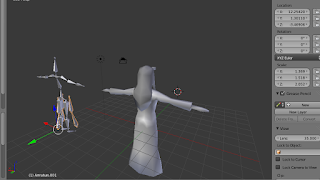 -Learning to apply textures on Mio (blender again)
 -Boy 3d model (blender again)
 -Cityscape 3d model (sketchup)

Yes it still on progress... a lot of stuff is going on with this project and i'm glad to participate on it!
I'm on the 3d part and helping with image files and of course with the lore and other ideas.
I let you some images of my work:
-Mio 3d model (blender)


Tuesday, 3 March 2015
[Unity 5] - How to make seamless loop with introduction part (loop point)
Hm.
Hmm.
Hmmmmmm!
HMMMMMMMMMM!
Meh. Unity 5 just got released today.
Also...
I've reinvented the wheel, I swear.
There wasn't much information in the Internet about seamless loop in Unity. Even less with looping from a certain point of the bgm.
I mean, no information.
So, here's a script I did that solved all of my problems.
[Version 2:
Here (Note the MIT License)
To use it you need to do, somewhere in your code, something like this:
And it should work.
Should.
Btw, referent to a certain comment, if you want to keep a bgm playing between levels...
Type this in the Play function, after the AudioClip.Create:
Object.DontDestroyOnLoad(audioClip);
Don't worry, that temporal Audio Clip is destroyed on each ChangeTrack call.
Again, it should work.]
[I did write some detailed explanation here, but somehow it got deleted. Heck]
A low-count-word (?) explanation:
I retrieve the full contents of the AudioClip, then I play it and when the bgm loops I wrap to the loop position.
Because the AudioSource time sets the time on every loop to 0 and not MusicLoopPoint, I made the Time and SampleTime properties that will return (and that you can set) the correct current time.
Note that it doesn't have Stop, Pause or similar functions. I didn't need them and I though that could be an exercise for the reader.
[The culprit of not having a detailed explanation is a Show/Hide button that I tried to insert here!]
To use it, attach a AudioSource to any GameObject, uncheck Loop and Play On Awake, attach this to some GameObject (can be the same) and drag n' drop the AudioSource to the Audio Source property in the Inspector. You can set the Spatial Blend to whatever you like.
Set the Audio Clip property to some awesome music, and specify correctly the Music Loop Point in seconds.
The Audio Clip must be decompressed on Load and I recommend Preload Audio Data and PCM compression.
Here's the code if the download fails:
Never, ever, trust Show/Hide buttons...
Hmm.
Hmmmmmm!
HMMMMMMMMMM!
Meh. Unity 5 just got released today.
Also...
I've reinvented the wheel, I swear.
There wasn't much information in the Internet about seamless loop in Unity. Even less with looping from a certain point of the bgm.
I mean, no information.
So, here's a script I did that solved all of my problems.
[Version 2:
Here (Note the MIT License)
To use it you need to do, somewhere in your code, something like this:
1 2 | var myInfiniteMusic = new InfiniteBackgroundMusic(); myInfiniteMusic.ChangeTrack(myAudioSource, myAudioClip, myLoopPoint); |
And it should work.
Should.
Btw, referent to a certain comment, if you want to keep a bgm playing between levels...
Type this in the Play function, after the AudioClip.Create:
Object.DontDestroyOnLoad(audioClip);
Don't worry, that temporal Audio Clip is destroyed on each ChangeTrack call.
Again, it should work.]
[I did write some detailed explanation here, but somehow it got deleted. Heck]
A low-count-word (?) explanation:
I retrieve the full contents of the AudioClip, then I play it and when the bgm loops I wrap to the loop position.
Because the AudioSource time sets the time on every loop to 0 and not MusicLoopPoint, I made the Time and SampleTime properties that will return (and that you can set) the correct current time.
Note that it doesn't have Stop, Pause or similar functions. I didn't need them and I though that could be an exercise for the reader.
[The culprit of not having a detailed explanation is a Show/Hide button that I tried to insert here!]
To use it, attach a AudioSource to any GameObject, uncheck Loop and Play On Awake, attach this to some GameObject (can be the same) and drag n' drop the AudioSource to the Audio Source property in the Inspector. You can set the Spatial Blend to whatever you like.
Set the Audio Clip property to some awesome music, and specify correctly the Music Loop Point in seconds.
The Audio Clip must be decompressed on Load and I recommend Preload Audio Data and PCM compression.
Here's the code if the download fails:
1 2 3 4 5 6 7 8 9 10 11 12 13 14 15 16 17 18 19 20 21 22 23 24 25 26 27 28 29 30 31 32 33 34 35 36 37 38 39 40 41 42 43 44 45 46 47 48 49 50 51 52 53 54 55 56 57 58 59 60 61 62 63 64 65 66 67 68 69 70 71 72 73 74 75 76 77 78 79 80 81 82 83 84 85 86 87 88 89 90 91 92 93 94 95 96 97 98 | using UnityEngine; using System.Collections; public class InfiniteBackgroundMusic : MonoBehaviour { [Header("To get/set audio position, use Time and SampleTime")] public float MusicLoopPoint; public AudioClip audioClip; public AudioSource audioSource; public float Time { get { long p = position; p /= entire.Length; return p * audioClip.length; } set { double m = value / audioClip.length; position = (long)(m * entire.Length); } } public float Duration { get { return audioClip.length; } } public long SampleTime { get { return position; } set { if(value >= entire.Length) { Debug.LogError("Value is larger than audioClip.samples"); } if(value < 0) { Debug.LogError("Value is lesser than 0"); } position = value; } } public int SampleDuration { get { return entire.Length; } } float[] entire; long position; int sampleLoopPoint; string audioName; int channels; int start; void Start () { double mul = MusicLoopPoint / audioClip.length; sampleLoopPoint = (int)(mul * audioClip.samples); channels = audioClip.channels; audioName = audioClip.name; entire = new float[audioClip.samples * channels]; audioClip.GetData(entire, 0); audioClip = AudioClip.Create(audioName + "_Loop", audioClip.samples, channels, audioClip.frequency, true, OnAudioRead, OnAudioSetPos); audioSource.loop = true; audioSource.clip = audioClip; position = 0; audioSource.Play(); position = 0; } void OnAudioRead(float[] data) { if(start < 64) { start++; position = 0; return; } int count = 0; while(count < data.Length) { data[count] = entire[position]; position++; count++; if(position >= entire.Length) { position = sampleLoopPoint*channels; } } } void OnAudioSetPos(int newPos) { } } |
Never, ever, trust Show/Hide buttons...
Subscribe to:
Comments (Atom)